







The Most Comfortable Gaming Chairs for Long Hours: Top Picks
Gaming is no longer the only reason we spend long hours at a desk. Whether you're gaming, working from home, or watching content, it's easy to spend six, eight, or even more hours in a chair each day. That makes choosing a comfortable gaming chair for long hours more important than simply finding a chair that feels good for a short session. For extended use, factors such as lumbar support, seat cushioning, adjustability, and overall fit can make a noticeable difference in how comfortable you feel over time.
A traditional office chair can certainly work for long periods, but many basic models prioritize practicality and cost over adjustability, support, and accommodating different body types. So, what is the best chair for long hours of gaming, and what should you look for when choosing one? In this guide, we'll compare some of the top options and break down the features that matter most for extended gaming, work, and other long desk sessions.

- 1. What Makes a Gaming Chair Comfortable for Long Hours?
- 2. Top 5 Best Gaming Chair Options for Long Sitting
- - AndaSeat Kaiser 4: Our Top Pick for Long Gaming Sessions 🔥
- - Herman Miller x Logitech G Embody: Premium Ergonomic Option
- - Razer Iskur V2: Adjustable Lumbar Support Option
- - AndaSeat X-Air: Office Chair Alternative for Long Gaming Sessions 🔥
- - Haworth Fern: Flexible, Upright Support Option
- 3. How to Set Up Your Gaming Chair for Long Sessions
- 4. Conclusion: Which is the Most Comfortable Gaming Chair?
- 5. FAQs About the Best Gaming Chairs for Long Hours
What Makes a Gaming Chair Comfortable for Long Hours?
Long-session comfort is not simply about having more padding or more ergonomic features. It depends on how well a chair distributes pressure, supports your body, allows you to change positions, manages heat, and fits your body throughout an extended session.
- Pressure Distribution: A well-designed seat should distribute your weight evenly and minimize pressure points around the hips, thighs, and lower back. Too much pressure in one area can become increasingly uncomfortable during long gaming sessions.
- Body-Supportive Design: Good support should work with your natural posture rather than forcing you into one fixed position. Proper lumbar and back support can help you stay supported while allowing some freedom to move.
- Freedom to Change Positions: Sitting in the same position for hours can become uncomfortable, regardless of how supportive the chair is. A useful recline range and flexible backrest allow you to shift between upright gaming, leaning back, watching content, and taking breaks.
- Breathability and Temperature Control: Heat buildup can become a major source of discomfort during extended gaming sessions. Breathable upholstery or materials that allow better airflow can help prevent your back and thighs from becoming excessively warm.
- A Comfortable Fit for Your Size: Seat width, seat depth, backrest height, and overall proportions should match your height and build. A chair that is too small can feel restrictive, while one that is too large may not provide support in the right places.
Top 5 Best Gaming Chair Options for Long Sitting
With the right balance of support, cushioning, adjustability, and fit, a gaming chair can remain comfortable well beyond a short gaming session. The following five options stand out for different long-sitting needs, from overall support and premium ergonomics to flexible positioning and body-specific comfort.
1. AndaSeat Kaiser 4: Our Top Pick for Long Gaming Sessions
| Factor | AndaSeat Kaiser 4 |
|---|---|
| Pressure distribution | High-density cold-cure foam with a soft-but-firm balance helps reduce pressure points while keeping the seat supportive. |
| Body support | 24° pop-out lumbar with any-angle lock and 4-way adjustment lets you fine-tune support to your preferred position. |
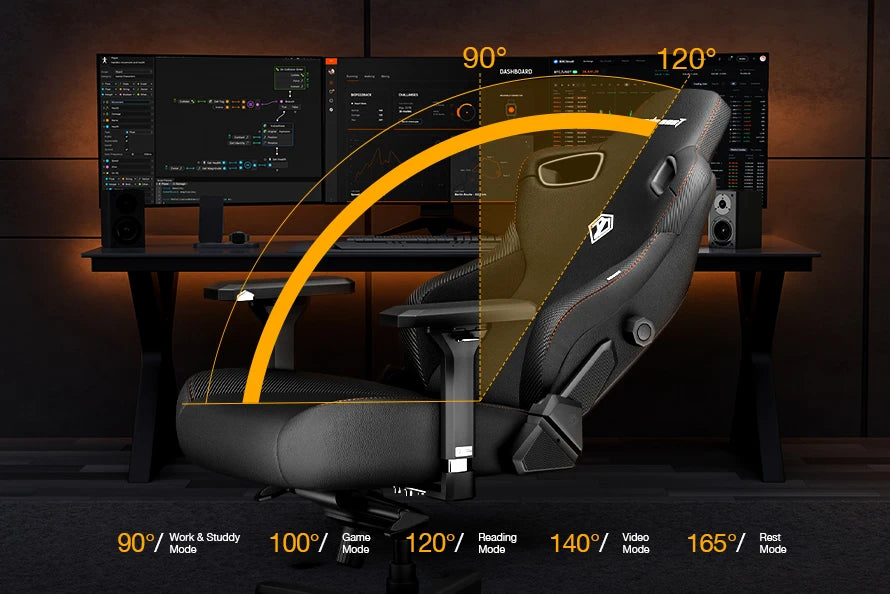
| Posture flexibility | 135° recline and 15° rocking mode make it easier to alternate between upright, reclined, and relaxed positions. |
| Temperature control | A cooling layer in the magnetic head pillow helps reduce heat buildup; Linen Fabric is also available as an upholstery option. |
| Size & fit | L and XL options accommodate users from 150–210 cm, with the XL supporting up to 180 kg. |
| Price | $549.00 USD before discounts |
In our testing, the AndaSeat Kaiser 4 remained comfortable during extended gaming sessions largely because of how it handles pressure and body support. The cold-cure foam seat strikes a balance between softness and firmness, while the raised sides and sloped front edge help maintain a stable sitting position. We also found the 24° pop-out lumbar particularly useful, as its angle, height, and depth can be adjusted to provide more personalized back support than a fixed lumbar profile.
The Kaiser 4 also makes it easy to change positions during longer sessions. Its 135° recline and 15° rocking mode allow for more relaxed sitting between periods of focused gaming, while the adjustable armrests and magnetic head pillow add support when reclining or switching between different activities. Based on our testing, it is one of the most comfortable gaming chair options for long hours of gaming, particularly for users who value adjustable support and the ability to change positions.

2. Herman Miller x Logitech G Embody: Premium Ergonomic Option
| Factor | Herman Miller x Logitech G Embody |
|---|---|
| Pressure distribution | Four-layer seat with elastic suspension and support coils for more even pressure distribution. |
| Body support | Adjustable back support that follows the shape and movement of your spine. |
| Posture flexibility | Supports upright, active, reclined, and relaxed postures with a flexible backrest. |
| Temperature control | Cooling foam helps reduce heat buildup during extended use. |
| Size & fit | Adjustable seat depth and height; supports up to 300 lbs. No separate size options. |
| Price | Around $1,691 USD |
In our testing, the Herman Miller x Logitech G Embody performed particularly well in pressure distribution and back support. Its suspended seat provides a firm but flexible feel, while the adjustable back support follows the spine as you change positions. We also found it effective at encouraging movement rather than keeping you in a fixed posture, and the cooling foam helps limit heat buildup during longer sessions.
The main trade-offs are its single-size design, relatively firm feel, and high price. While the seat height and depth offer some flexibility, it may not suit users who prefer a softer, more cushioned gaming chair or need a wider range of size options. For users who prioritize ergonomic support, pressure distribution, and freedom of movement, the Embody is a strong premium option for long gaming sessions.
3. Razer Iskur V2: Adjustable Lumbar Support Option
| Factor | Razer Iskur V2 |
|---|---|
| Pressure distribution | Dual-density cold-cured foam seat with a wider, flatter base to reduce pressure points. |
| Body support | Adjustable lumbar support with height, depth, and side-to-side movement. |
| Posture flexibility | 152° recline and responsive tilt mechanism support different sitting positions. |
| Temperature control | Cool-touch upholstery helps reduce heat buildup. |
| Size & fit | Recommended for users 160–200 cm and up to 136 kg; wider seat base accommodates different sitting positions. |
| Price | $649.99 USD |
In our testing, the Razer Iskur V2 stood out mainly for its adjustable lumbar system. The ability to change the lumbar support in multiple directions makes it easier to find a comfortable position as you move or shift your posture, while the wider, flatter seat provides more freedom to sit in different ways. The 152° recline also makes the chair suitable for switching between focused gaming and more relaxed positions.
The main trade-off is that its strength is more concentrated on lumbar and positional support than overall cushioning. The synthetic upholstery may also feel warmer than fabric during extended sessions, although the cooling treatment helps address this. For users who prioritize highly adjustable lumbar support and a more flexible sitting position, the Iskur V2 is a strong option for long gaming sessions.
4. AndaSeat X-Air: Office Chair Alternative for Long Gaming Sessions
| Factor | AndaSeat X-Air |
|---|---|
| Pressure distribution | Soft, tensioned mesh and sloped seat edges help reduce pressure on the back, hips, and thighs. |
| Body support | C-shaped dynamic lumbar and adjustable backrest height adapt support to different body shapes and postures. |
| Posture flexibility | 105°–126° recline with adjustable tilt supports upright, reclined, and relaxed positions. |
| Temperature control | All-mesh seat, backrest, and headrest allow continuous airflow to reduce heat buildup. |
| Size & fit | 10 cm seat-height adjustment, adjustable armrests, 3D headrest, and backrest height adjustment provide a flexible fit. |
| Price | $399.00 USD before discounts |
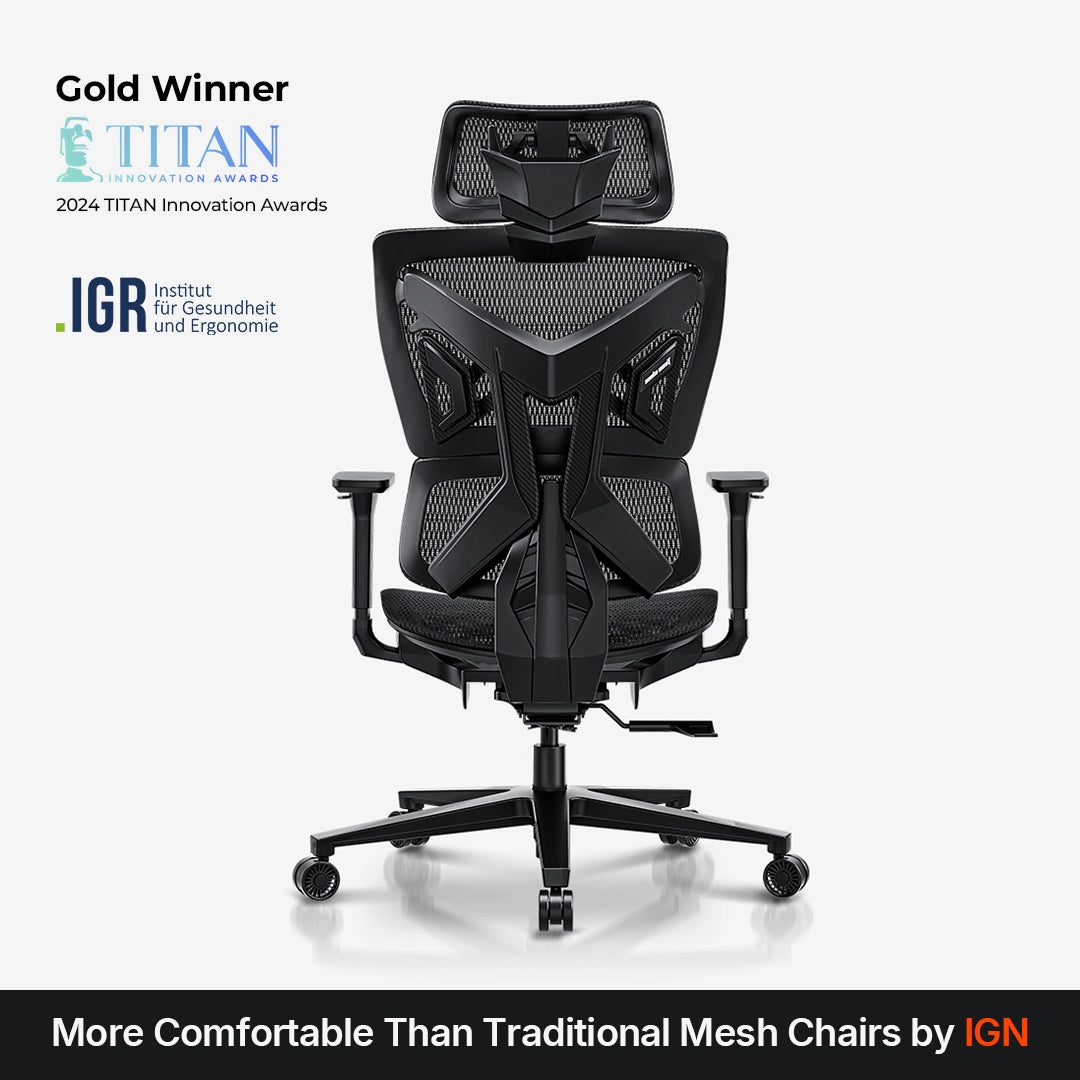
In our testing, the AndaSeat X-Air was particularly comfortable during longer sessions where heat buildup and pressure around the thighs or hips became concerns. The breathable mesh keeps airflow moving through the seat and backrest, while the sloped seat edges and dynamic lumbar provide support without creating a heavily cushioned feel. Its adjustable recline, armrests, headrest, and backrest height also make it easy to change positions throughout a long session.
Compared with a more traditional gaming chair, it is better suited to users who prefer breathability, flexible support, and a lighter seating feel. For users who prefer a cooler, more open seating experience, X-Air offers a mesh-based alternative to traditional gaming chairs. Its all-mesh construction, pressure-relieving seat edges, and adjustable back support make it even suitable for long gaming and work sessions.
5. Haworth Fern: Flexible, Upright Support Option
| Factor | Haworth Fern |
|---|---|
| Pressure distribution | Flexible backrest and waterfall seat edge help reduce pressure on the back, thighs, and knees. |
| Body support | Contoured backrest provides built-in lumbar support, with optional height adjustment for a more personalized fit. |
| Posture flexibility | Flexible backrest, 5-position back stop, tilt tension, and optional forward tilt support different sitting positions. |
| Temperature control | Available with breathable mesh upholstery; airflow depends on the selected material. |
| Size & fit | Adjustable seat height and 3-inch seat depth, with a 19.9-inch seat width and up to 350-lb capacity. |
| Price | $1,330.00 USD |
In our testing, the Haworth Fern Ergonomic Chair felt most distinctive in the way its backrest moved with the body rather than holding it in a fixed position. The flexible back and built-in lumbar support provided consistent support when sitting upright or shifting from side to side, while the waterfall seat edge helped reduce pressure around the thighs during longer periods of sitting. The adjustable seat depth also made it easier to find a comfortable leg position.
The Fern is a strong option for users who prefer flexible, upright support and an active sitting experience. Its comfort is less about thick cushioning and more about how the chair responds to movement and distributes support across the body. However, the $1,330 price is substantially higher than the other options on this list, and features such as the adjustable lumbar and headrest are optional, so its value depends heavily on the configuration.
How to Set Up Your Gaming Chair for Long Sessions
A few simple adjustments can make a gaming chair even more comfortable for long sessions, helping it fit your body and playing setup better. If you're currently using a standard chair, there are also practical ways to improve its comfort and support without replacing it right away.
How to Adjust Your Gaming Chair for the Best Comfort?
Even the most comfortable gaming chair needs to be adjusted to suit your body. Before a long gaming session, check the following:
- Set the seat height and depth: Keep your feet flat on the floor and leave enough space between the seat edge and the back of your knees. Your thighs should feel supported without excessive pressure.
- Position the lumbar support: Adjust it so it comfortably follows the natural curve of your lower back without pushing you too far forward.
- Align the armrests: Set the armrests high enough to support your forearms while keeping your shoulders relaxed. Adjust their position to match your desk and how you use your mouse or controller.
- Find a comfortable recline: Use the backrest recline to change your sitting position throughout the session rather than staying completely upright for hours.
There is no single adjustment that works for everyone. The best setup is one that supports your body comfortably while still allowing you to move and change positions naturally.
How to Make an Uncomfortable Gaming Chair More Comfortable?
If your current chair is not particularly comfortable, a few simple changes can improve the experience without replacing it immediately:
- Add lumbar or seat support: A small lumbar cushion can fill gaps between your lower back and the backrest, while a suitable seat cushion can reduce pressure if the seat feels too firm.
- Improve airflow: If heat is the main source of discomfort, use a breathable seat cover or cushion and avoid materials that trap heat around your back and thighs.
- Adjust your desk and monitor: Set the desk and monitor at a comfortable height so you are not constantly leaning forward, raising your shoulders, or bending your neck to see the screen.
- Change positions regularly: Even with added support, avoid staying in the same position for hours. Stand up, stretch, or simply shift your posture during longer sessions.
These adjustments can make a basic chair more comfortable, but they cannot fully compensate for a chair that is the wrong size or lacks adequate support.
Conclusion: Which is the Most Comfortable Gaming Chair?
There is no single most comfortable gaming chair for everyone. The right choice depends on your body size, preferred sitting style, and what tends to cause discomfort during long sessions.
The Herman Miller x Logitech G Embody and Haworth Fern are strong choices for users who prioritize dynamic ergonomic support, while the Razer Iskur V2 is particularly suited to those who want highly adjustable lumbar support. If breathability is your main concern, the AndaSeat X-Air offers a lighter, all-mesh seating experience that works well for both gaming and office use.
For an overall balance of pressure distribution, adjustable support, posture changes, and fit, we found the AndaSeat Kaiser 4 to be the most well-rounded option in our testing. Its adjustable lumbar support, supportive seat, recline range, and multiple size options make it easier to adapt to different users and sitting preferences. Ultimately, the most comfortable chair is the one that fits your body and allows you to stay supported without keeping you locked in one position for hours.
FAQs About the Best Gaming Chairs for Long Hours
What is the best gaming chair for long hours of gaming?
The best gaming chair for long hours depends on your body size, preferred sitting position, and comfort needs. Based on our testing, the AndaSeat Kaiser 4 is a strong overall choice because it combines adjustable lumbar support, pressure-balanced cushioning, multiple size options, and a recline range that makes it easier to change positions during long sessions.
Can I sit in a gaming chair for 8 hours?
You can sit in a gaming chair for 8 hours, but no chair makes uninterrupted sitting ideal. A well-fitted chair can provide better support and reduce discomfort, while regular movement, posture changes, and short breaks are still important during extended gaming sessions.
Is a gaming chair better than an office chair for long hours?
Neither is automatically better. Gaming chairs often provide more pronounced cushioning, recline, and body-contoured support, while ergonomic office chairs tend to emphasize flexible movement and upright support. For long gaming sessions, the better choice is the one that fits your body and provides comfortable support without restricting movement.
Is a soft gaming chair better for long hours?
Not necessarily. A softer seat may feel comfortable initially, but too much cushioning can allow your body to sink in and create uneven pressure over time. For long sessions, a balance of cushioning, pressure distribution, and stable support is generally more important than simply choosing the softest chair.